Ver.26.1
· 2 min read
Results
Reported main resource and Reported scrap quantity
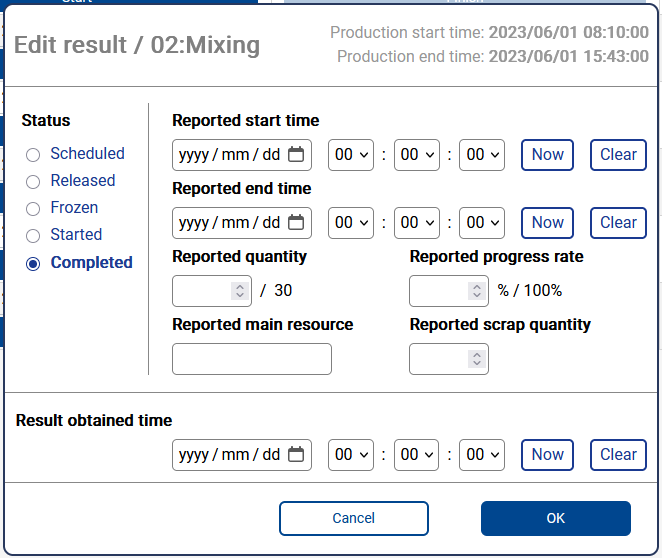
It is now possible to enter "Reported main resource" and "Reported scrap quantity" on My Schedule in the Result edit dialog. These properties will appear in the dialog after enabling them through "Allow keying following result properties" project settings.
Project admin settings
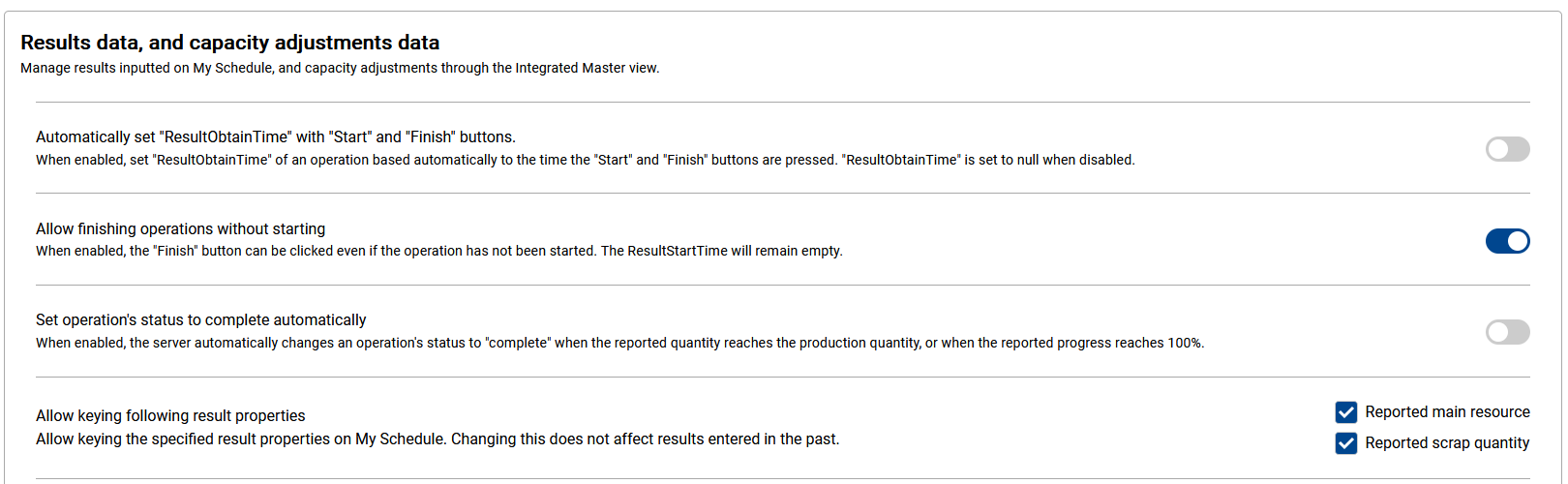
The following project admin settings are introduced.
- Automatically set "ResultObtainTime" with "Start" and "Finish" buttons: When enabled, set "ResultObtainTime" of an operation based automatically to the time the "Start" and "Finish" buttons are pressed. "ResultObtainTime" is set to null when disabled.
- Allow finishing operations without starting: When enabled, the "Finish" button can be clicked even if the operation has not been started. The ResultStartTime will remain empty.
- Set operation's status to complete automatically: When enabled, the server automatically changes an operation's status to "complete" when the reported quantity reaches the production quantity, or when the reported progress reaches 100%.
Other improvements and fixes
- (fix) When creating a user who logs in to My Schedule by authenticating himself with Active Directory, specifying values not formatted as UserPrincipalName as username is now an error. Entering sAMAccountName as username when logging in continues to be valid.
- (improvement) On table-like views, added an option to display all rows.
- (fix) On Resource gantt chart, when there were only non-production use-instructions for an operation on a resource, the operation could be displayed twice on the timeline.
- (fix) On Resource gantt chart, when only the resource lock of an operation overlapped the upload period, the resource lock was not displayed.
- (improvement) It is now possible to scroll on the "Chart" area of gantt charts, in addition to "Table" area and "Calendar Header" area.
- (fix) Result timestamps such as "Reported start time" could be determined as if the project's timezone was set to UTC when registering results immediately after loading a view.
- (fix) It was impossible to enter "Reported quantity" greater than "Production quantity."
- (improvement) Upon opening My Schedule Settings on Asprova, invalid style names set in the past are now removed automatically.
- (fix) On Resource gantt chart, 24h shift (00:00-24:00) was regarded as non-existent in appearance.